Model YK-B-15A:
Function Description
① This temperature controller has soft start mode, manual mode and automatic mode functions. The soft start mode is the preheating and dehumidification function, which prevents damage to the heater due to mold moisture, thereby extending the service life of the hot runner.
② Thermocouple type J or K adjustable; temperature unit ℃ or ℉ adjustable, displayed in the PV window. Temperature setting range: 34-534℃
③ Input voltage: 220VAC±10% 50—60Hz or 110VAC±10% 50—60Hz optional.
④ Multiple alarm and protection functions: Low temperature alarm, high temperature alarm, thermocouple break alarm, thermocouple reverse connection alarm, hot runner leakage protection alarm, hot runner short circuit and over-power protection, automatic power-off protection for wrong power line connection or missing neutral line.
Alarm code description and fault cause prompt:
Code | Description | Fault Cause Prompt |
Lo | Low Temperature Alarm: This alarm is displayed when the actual temperature is 25℃ lower than the set temperature in constant temperature state. | 1. Set temperature increased by more than 25℃;2. Temperature controller damaged;3. Hot runner heating element damaged;4. Poor contact of connecting wires |
Hi | High Temperature or Thermocouple Break Alarm: This alarm is displayed when the actual temperature is 30℃ higher than the set temperature. This alarm is also displayed when the thermocouple is broken. | 1. Set temperature decreased by more than 30℃ in constant temperature state;2. Thyristor short circuit;3. Thermocouple broken or poor contact of connecting wires |
E-04 | Thermocouple Reverse Connection Alarm: This alarm is displayed when the temperature drops to 0℃ during heating startup. | 1. Positive (+) and negative (-) poles of thermocouple connected reversely to the temperature controller. |
Automatic Trip on Power-On | Power-Off Protection | 1. Wrong wiring;2. Missing neutral line |
Technical Parameter Table Function Parameter Setting Table
Item | Code | Description | Factory Setting | ||
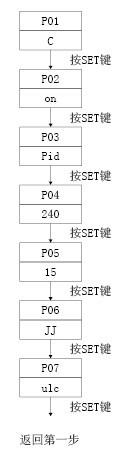
Input Voltage | 85V—250VAC | P01 | Temperature Unit Setting: Can be set to ℃ or ℉ and displayed in the SV window | ℃ (Celsius) | |
Input Frequency | 50—60Hz | ||||
Operating Temperature | -10℃—55℃ | P02 | Alarm On/Off Setting: Set to ON to activate alarm function, set to OFF to disable alarm function | ON | |
Storage Temperature | -20℃—70℃ | ||||
Fuse Specification | 15A 250V ø6mm×30mm, 1‰sec | P03 | Control Mode Selection: PID control mode or F2Y control mode | PID Mode | |
Thermocouple Type (Index Number) | K, J | ||||
Temperature Setting Range | 40℃—540℃ | P04 | Low Temperature Time Setting: Setting range 0—255S | 240S | |
Sampling Speed | 0.1S | ||||
Temperature Measurement Accuracy | ±0.1℃ | P05 | High Temperature Time Setting: Setting range 0—80S | 15S | |
Temperature Control Accuracy | ±1℃ | ||||
Output Voltage | 0—220V | P06 | Sensor Type Selection: K type or J type adjustable | Set according to customer requirements | |
Maximum Output Power | 3.6KW | ||||
Temperature Unit | ℃, ℉ | P07 | Key On/Lock Selection: "uLc" means keys are unlocked (usable); "Loc" means keys are locked (unusable) | "uLc" | |
Function Parameter Setting: Press the SET key for 3 seconds to enter the parameter setting state, the display sequence is as follows: | |||||
| Temperature Unit Setting: |
Alarm On/Off: | |
Control Mode Selection: Press ▲ to select PID mode, press ▼ to select F2Y mode (PID mode is recommended). | |
Low Temperature Time Setting: Press ▲ ▼ to modify the setting time (unit: S, range: 0—255S, usually set to 240S) | |
High Temperature Time Setting: Press ▲ ▼ to modify the setting time (unit: S, range: 0—80S, usually set to 15S) | |
Sensor Selection (J or K Thermocouple): Press ▲ to select J thermocouple (displayed as JJ), press ▼ to select K thermocouple (displayed as " "). | |
Keyboard On/Lock Selection: Press ▲ to unlock keyboard (displayed as uLc), press ▼ to lock keyboard (displayed as Loc) |
Operation Instructions:
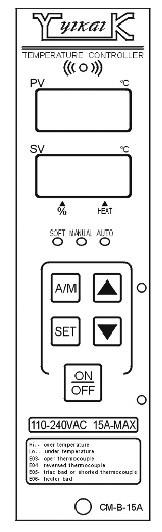
| PV Window: Displays actual measured temperature, displays parameter serial number during parameter setting. |
Key Description In manual mode (MAN light on), the heating wire operates at XX% voltage indicated in the SV window and maintains this mode. | |
▲▼ Up/Down Adjustment Keys: Used to set the percentage of voltage applied to the heating wire in manual mode; | |
SET: Function Setting Key |
SET Key Description: Press SET key once to display XXP (heating voltage percentage); press again to display XXA (heating current); press SET key for 3 seconds to enter parameter setting function.