



YK-D-15A
YK-D-15A Thermostat Operating Instructions
I. Functional specification
1) Using FUZZY PIDD control or PID control technology, making it automatically adapts to any fever model and greatly improves work efficiency in the absence of tuning PID parameters.
2) Automatic ambient temperature linear compensation function, ensuring the temperature value of controller becomes more accurate.
3) Thermocouple automatic cold junction compensation function is used for avoiding the relative error due to environmental temperature change.
4) The automatic control function of thermocouple (temperature line) disconnect: if the temperature line disconnected at a constant state, temperature controller will automatically remember the constant temperature parameters after alarm, and then continue to control. Mould hot runner will not be repaired until the completion of production, which can avoid the thermocouple disconnected and production losses caused by thermocouple disconnect.
5) Alarm protection:
Missing zero line or wrong connection of power lines alarm, short circuit of hot runner power line alarm, short circuit of hot runner temperature line alarm, disconnect of hot runner temperature line alarm, open circuit of hot runner power line alarm, wrong connection between power line and temperature line of hot runner alarm, connection reversed of positive and negative of temperature line alarm, high temperature alarm, low temperature alarm, SCR damage alarm, power overload alarm, protective tube damage alarm.
Alarm information Technological parameter date Function parameter factory setting
|
Fault information |
Fault cause |
|
Item |
Parameter |
|
Item |
|
|
|
Power supply error |
Input voltage |
185-250VAC |
Thermocouple type |
J type |
||
|
|
Short circuit of heating elements |
Mains frequency |
50-60HZ |
Over-temperature alarm limit |
30℃ |
||
|
|
wrong connection between heating elements and temperature line |
Operating temperature |
-20—60℃ |
Low temperature alarm limit |
-30℃ |
||
|
|
Open circuit of heating elements |
Storage temperature
|
-30—70℃ |
Temperature unit
|
Degree centigrade
|
||
|
|
Open circuit of temperature line |
Protective tube
|
15A 6×30mm |
Control mode |
PIDD |
||
|
|
temperature measurement abnormal |
Thermocouple |
J,K adjustable
|
Soft-start mode |
ON Open |
||
|
|
Thermal line reverse |
Settemperature range |
45—537℃ |
|
|||
|
|
SCR damage |
Sampling speed |
0.1S |
|
|||
|
|
Break of test wrapper |
Temperature measurement accuracy |
0.1℃ |
|
|||
|
|
Current overload |
Temperature control accuracy |
±0.5℃ |
|
|||
|
|
Insurance tube damage of F1 |
Control mode |
PIDD or PID |
|
|||
|
|
Insurance tube damage of F2 |
Output power |
0—3.6KW |
|
|||


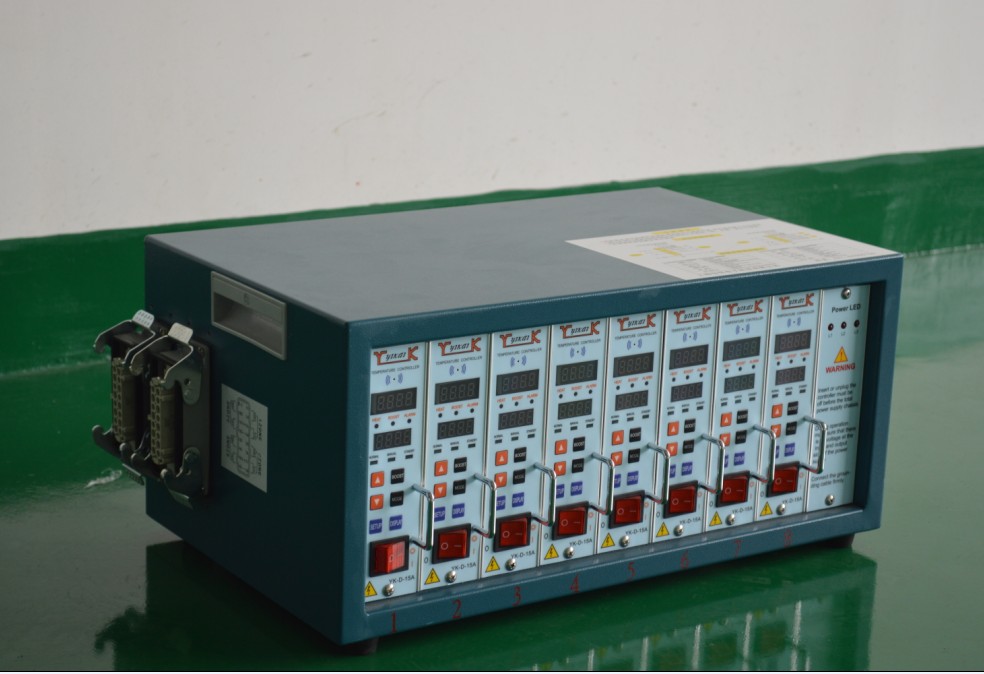
II. Panel description:
1. Display window:
PV shows the actual temperature; The SV displays set temperature
2. Indicator light:
HEAT: output heating indicator light
BOOST: heating propulsion indicator light
ALARM: fault alarm indicator
NORMAL: automatic control mode indicator light
MANUAL: Manual control mode indicator light
STANDBY: standby mode
3. Key introduction:
▲ ▼Adjust buttons (up and down)
SETUP function option key
BOOST heating propulsion key: (Press BOOST key to start heating boost function for 1 time, and press another time to close. when the heating propulsion function is turned on, BOOST indicator lights turns red, the output ratio increases by 20%, and heating speed becomes faster, which will automatically recover to normal heating state after15 seconds).
MODE: Mode option key
DISPLAY: Check parameter key (Check that the proportion of output current and output current)
III. Temperature and functional parameters setting description
(1). Temperature setting: Press ▲ ▼key to increase or decrease the setting temperature, and then the thermostat will confirm and storage automatically.
(2). Functional parameters setting
|
Normal starting up |
|
Press MOOD key for 2 seconds until the blue indicator light turns to MANUAL (middle) one. |
|
Next step ↓ |
|
Press MOOD key for 2 seconds until the blue indicator light turns to STANDBY (right) one. |
|
Next step ↓ Soft start function turned on or off |
|
Press the MODE key and the SETUP key for 2 seconds at the same time, and then enter the soft-start mode setting status: PV display window shows SOFT; SV display window shows ON, the soft-start function is turned on; Press ▲ key to Close, SV display window shows OFF; Press ▼ key to open, SV display window shows ON. |
|
Next step ↓ Temperature unit setting |
|
Press the SETUP key for once to enter the temperature unit setting status: Press ▲ for the method of Fahrenheit, SV display window shows F; Press ▼ to Celsius, SV display window shows C. |
|
Next step ↓ Temperature line model setting |
|
Press the SETUP key for once to enter the temperature line model setting status: PV display window shows SENS, SV display window shows J denoting temperature sensing line model is J, SV display window shows J denoting said temperature sensing line display models is K type. Press ▲ for K-type, press ▼ for J type. |
|
Next step ↓ Output control mode setting |
|
Press the SETUP key for once to enter the output control setting state: PV display window shows OUT, SV display window shows PIDD or PID, press ▲ ▼ to select. The factory setting is PIDD mode. |
|
Next step ↓ Ultra (high) temperature alarm limit setting
|
|
Press the SETUP key for once to enter the over-temperature alarm limit setting status: PV display window shows AL-H, SV digital display window, the factory setting is 30, namely, the production process temperature exceeds 30 ℃ that alarm. Press ▲ ▼ to change the digital setting. |
|
Next step ↓ Low temperature alarm limit setting
|
|
Press the SETUP key for once to enter the low temperature alarm setting state: PV display window shows AL-L, SV digital display window, the factory setting is 30, namely, the production process, lower the temperature at 30 ℃ alarm. Press ▲ ▼ key to change the setting. |
|
Next step ↓ Temperature correction |
|
Press SETUP1 key for one time to enter the temperature correction status: Press ▲ key to increase SV display temperature, press ▼ key to reduce SV display temperature, when the displayed temperature is lower than the actual temperature, press ▲ key to up-regulate parameters (maximum adjustable to 10); When the temperature display higher than the actual temperature, press ▼ key to down-regulate parameters (minimum adjustable to -10). |
When the desired function parameters are set, press the SETUP key for 2 seconds, the display window releases after conversion, press SETUP key for 2 seconds, the display window conversion after release, which returned to normal temperature state, complete the setup.
Manually control the output power adjustment manner:
Temperature line is disconnected: it will display temperature line is disconnected alarm after starting up, PV display shows TC oPEn, SV display shows Cond; then press the SETUP key for 1-3 seconds, PV display shows TC oPEn, SV display windows tESt; Now press the SETUP key for 1-3 seconds, PV display shows TC oPEn, SV display shows 0P. Then press ▲ key to set the output power percentage according to production needs. First it will be set of 20P heating for 10-30 minutes (nozzle is different from spreader plate), and then set according to the heating situation.