



YK-B-15A instruction manual
YK-B-15A
Function:
1.The temperature controller has a soft start mode, a manual mode, and an automatic mode function. The soft start mode is a warm-up and dehumidification function, so that the heater is not damaged due to wet molds, thereby prolonging the service life of the hot runner.
2. Index No. J or K is adjustable; temperature unit °C or °F adjustable displays in the PV window. Temperature setting ranges 34-534°C.
3. The input voltage is available for 220VAC±10%50-60HZA or 110VAC±10%50-60HZA.
4. There are a variety of alarm and protection functions:
Thermocouple disconnection alarm
Thermocouple reverse connnection alarm
Fuse damage alarm
Heater disconnection alarm
Heater power line disconnection alarm
SCR damage alarm
High temperature alarm
It will start the automatic protection in case of lacking of zero line or fire line or fire wire or connecting the zero line or fire wire in the wrong position to protect the accessories from any damages.
It can give alarm in case of reaching the setting temperature to protect the raw material from burnout.
Alarm code description and fault reason prompt
| Code number | Instruction | Fault reason prompt |
| L○ | Low temperature alarm:In the constant temperature state, this alarm prompt appears when the actual temperature is lower than the set temperature 25°C. |
1. The setting temperature exceeds 25 ℃. 2. Temperature control meter damage 3. Hot runner damage 4. Power line disconnection
|
| Hi | High temperature or temperature line disconnection alarm:This alarm is displayed when the actual temperature is higher than the set temperature of 30 ℃. |
1. Under constant temperature, the setting temperature down by more than 30 ℃. 2. SCR short-circuit 3. Temperature line or power line disconnection
|
| E-04 | Temperature line reverse connection alarm: This alarm occurs when the heater starts but the temperature falls to 0 ℃. | 1. The positive and negative polarity of temperature line reverse connect with temperature controller meter. |
|
Boot automatically trips |
power protection |
1. Line fault connection 2. Lack of zero line |
Technical parameter table Function parameter setting table
|
Project |
Number | Instruction | Factory settings | |
| Input voltage | 85V-250VAC | P01 |
Temperature unit setting: It can be set to °C or °F and displayed on SV display window. |
°C |
| Input frequency | 50-60HZ | P02 |
Alarm on or off setting: set 0N then the alarm function starts, if set OFF, the alarm function is cancelled. |
ON |
| Operating temperature | -10℃-55℃ | P03 |
Control mode selection: PID control mode or F2y control mode. |
PID mode |
| Storage temperature | -20℃-70℃ | P04 |
Low temperature time setting: Setting range 0-255s |
240s |
| Fuse specifications |
15a250Vø6mm×30mm,1‰sec |
P05 |
High temperature time setting: Setting range 0-80s |
15s |
|
Index number |
K,J | P06 |
Selection of sensor models: K or J available |
According to customers' demand |
|
Setting temperature range |
40℃—540℃ |
P07 |
Press the key to open or lock. Select "uLc" then press the key to open, that is, you can use; "Loc" the key is locked, that is, you can not use. |
uLc |
|
Sampling speed |
0.1S | |||
|
Temperature measurement accuracy |
±0.1℃ |
|||
|
Temperature control accuracy |
±1℃ |
|||
|
Output voltage |
0—220V |
|||
|
Maximum output power |
3.6KW | |||
|
Temperature unit |
℃、℉ | |||
|
Function Description: number settings: press SET key to enter the parameter settings after three seconds. The order is as following: |
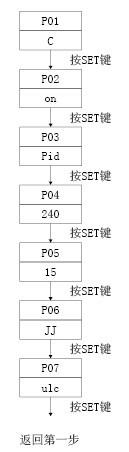
Temperature unit setting:
Press ▲ key to select the unit as ℃, display ℃, press ▼ key to select unit as ℉, display ℉.
Alarm on or off:
Press ▲ key to alarm and display ON; press ▼ key to alarm and display OFF.
Selection of control mode:
Press ▲ to select PID mode and press ▼ to select F2Y mode, which is generally PID mode.
Low temperature time setting:
Press ▲ ▼ to modify the setting time, the unit is S, the range is 0-255S, the general setting is 240S.
High temperature time setting:
Press ▲ ▼ to modify the setting time, the unit is S, the range is 0-80S, the general setting is 15S.
The sensor selects the J indexing number or K indexing number:
Press ▲ to select the J index number, and display "JJ". Press ▼ to select K index number and display “KK”.
Keyboard open or lock selection
Press ▲ key to select the keyboard to open, display uLc, press ▼ key to select the keyboard lock, display Loc
Use operation instructions
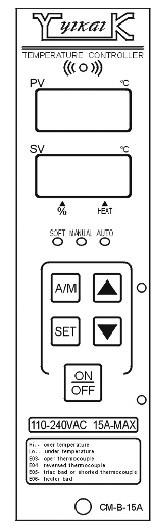
PV window: Displays the actual measured temperature. The parameter number is displayed during parameter setting.
SV window: Displays the set temperature and temperature unit (°C or °F). The specific parameters are displayed when the parameter is set.
HEAT ▲: The indicated fractional light indicates that the heating wire is normally energized, and no light indicates that the heating wire is not energized.
% ▲: The indicated decimal point indicates that the displayed data is XX%. The percentage of operating voltage applied to the load is displayed in manual mode.
Key description
AM key: soft start, manual, automatic switch In the soft start mode, the SOFT light is on, press this key to enter the automatic mode, the AUTO light is on, and then press this key to enter the manual mode, the MAN light is on, then press this key to enter the soft start mode, the SOFT light is on. When the power switch is turned on and the temperature of the heating wire is lower than 120°C or 255°F, the temperature control table automatically enters the soft start mode SOFT light, heating wire Slow heating, automatically switch to automatic mode after 4 minutes, AT light is on. In manual mode (MAN light), the heating wire will work at the XX% voltage indicated by the SV display window and maintain this mode. In automatic mode (AUTO light), the heating wire will add 100% voltage and keep this mode. Press SET key once to show that XXP is the percentage of heating voltage; press SET key for 3 seconds will enter the parameter setting function.
▲▼ up and down adjustment keys:
In automatic and soft start mode, it is used to set the control temperature, increase or decrease once every time, hold fast and adjust to meet the requirement.When temperature is released, the temperature is automatically saved by loosening the key.In manual mode, it is used to set the percentage of voltage added to the heating wire.Function parameters are set to modify the set parameters.
SET: function setting keys
ON/OFF power switch: Press once the power is on and then press the power off again.
The SET key shows that the SET key shows the percentage of the heating voltage by the XXP key, and then displays the heating flow according to the display of XXA at one time; the SET key will enter the parameter setting function after 3 seconds.